How FoxPlug works

The long version of the home page: each thing it does, what it reads and what it never does. The six steps are at the bottom.

Everything it does, one screen at a time

Each picture is a real crop of the sample startup, with made-up figures. Under each: the tools it reads, and what it never does.

Today brief

One thing to fix, one to say, one to skip.

Each comes with the number behind it, read from your own tools.

Reads

Never: Posts or sends anything for you.
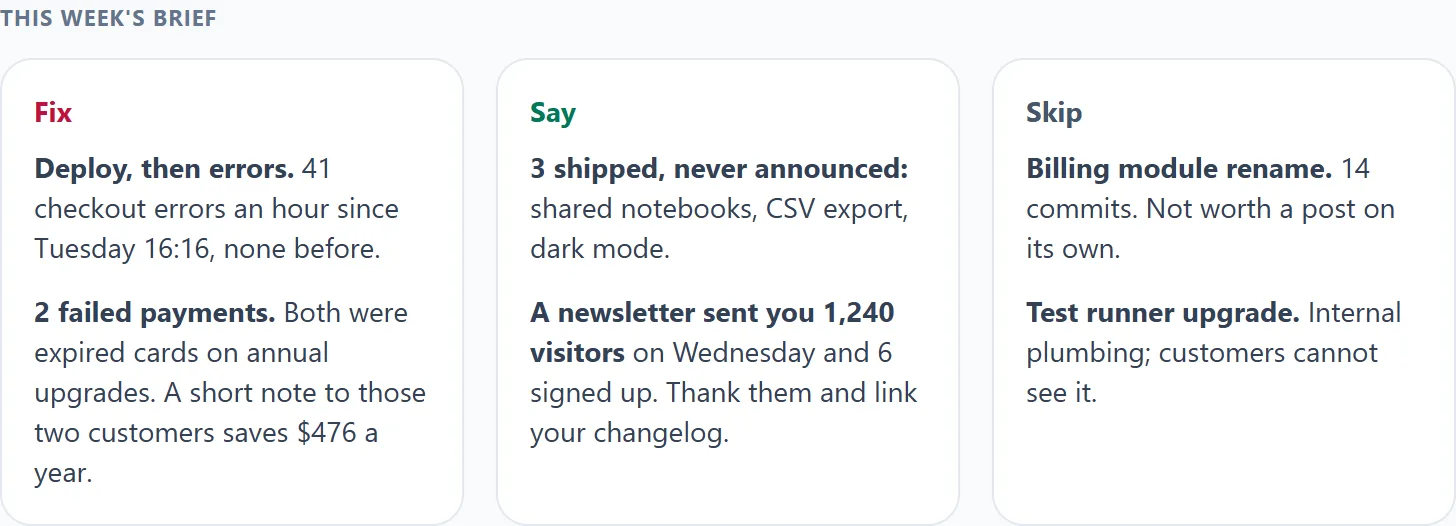
The sample Today brief: Fix, Say and Skip, each with a short reason and a number

Where it moved

Visits down 31%? It shows the page and the source.

Compared with the same weekdays of earlier weeks, so a quiet Sunday is not an alarm.

Reads

Never: Guess a reason it cannot show.

The sample Where it moved card: visits down 31%, 80% of the drop on /pricing, 70% from google.com

Promise keeper

Three people asked. You shipped it. Tell them.

It matches what people asked for to what you shipped, and drafts a reply to each.

Reads

Never: Send the reply. You press send.

The sample Promise keeper card: a shipped CSV export, three people who asked, and a drafted reply

Decision log

Log a decision with the number that would change your mind.

When that number moves, the brief asks: does this still hold?

Reads

Never: Reverse a decision for you.

The sample decision card: a free-plan decision that no longer holds, with the visits behind it

Why they cancelled

For each cancellation, what they did before leaving.

Their last visit and the errors they hit, matched by the email Stripe holds. Facts only.

Reads

Never: Guess why someone left.

The sample Why they left card: a cancelled customer, their last visit and the errors they hit

Frustrated clicks

Where people get stuck, tied to the deploy that did it.

The worst rage-click on your site, from the replay tools you already use.

ReadsMicrosoft Clarity

Never: Record anyone or add anything to your site.

The sample frustrated clicks card: people rage-click Export on /dashboard after Friday's deploy

Money panel

At risk, recovered, saveable this week, won back.

Added up from your own Stripe, with where each number came from. Tools that do only this cost more than all of FoxPlug Pro.

Reads

Never: Change anything in Stripe or email your customers.

The sample Money panel: four monthly totals, at risk, recovered, saveable this week and won back, each with its customer count and source

Win-back studio

Search everyone who left. Invite back the right ones.

Search "export", see who asked for it, draft an invite. Opted-out and disputing people are greyed out.

Reads

Never: Email anyone. You send every note.

The sample Win Back studio: search export, five people shown, two greyed out as not selectable

Investor update

Your monthly update, written for you.

Revenue, customers, traffic and what shipped. Every number names its source and date.

Reads

Never: Send it. A missing source is left out, never guessed.

The sample monthly update: MRR up 12%, new subscriptions, traffic and what shipped

Learning

It learns what you care about.

Approve or turn down, and that kind of update ranks higher or lower next time.

Reads

Never: Post by itself, ever.

The sample learning card: you approve shipped features and turn down internal plumbing

Nothing connected yet? Your first brief is read from your site's public pages, and each tool you connect after that makes it sharper. Share my brief turns a brief into a public card you preview first, publish yourself and can take down any time. Brief notices are off until you turn them on: a browser notice about once a day in the morning, never by email; free accounts get the first one, paid plans keep them.

Nothing here posts, sends or changes anything on its own. See pricing · how the money part differs from dunning tools.

Serial

Working with other people

Serial includes a team workspace: you plus four people. Everything above stays yours to press; the team just shares the view and the to-do.

Invite

One link per person.

You pick a role and the projects they get. The link works once and expires; the person signs in with the address you invited.

Together

Assign it, comment on it.

Hand a Fix, Say or Skip line to someone with a note, see “For you” when it is yours, and @mention a teammate. An activity feed shows who did what.

Control

Two-step sign-in and an audit log.

Require an authenticator app of everyone, sign a person out of every device, and download who did what as a CSV. Removing someone signs them out everywhere and takes their access away.

RoleWhat they can do
Owner (you)Everything, including billing and the two-step requirement.
AdminInvites and removes people, sees every project, connects tools, edits and sends, reads the audit log. No billing.
EditorWorks on the projects you give them: edits drafts, sends, assigns and comments. Sees customer names only if you allow it.
Viewer / clientReads the brief for the project you give them and comments. No customer names unless you allow it, and money totals only if you switch them on.

Free and Pro are for one person. See pricing

The tools FoxPlug talks to

The tools you connect, so FoxPlug can read what you ship. None of them is a sponsor, and none has endorsed FoxPlug.

Connects to

  • GitHub GitHub
  • Vercel Vercel
The six steps and the builder list
It looks out for you

Your analytics tell you what happened.
FoxPlug tells you what to do about it.

One account’s board · their own site · pulled 22 Aug 2026

What the numbers are asking

22%how far down the page they get
1.2pages opened per visit

Only 9 of those 24 sessions were people. The rest were bots.

“People are arriving and leaving without reading. Is the landing page saying the wrong thing, or the right thing to the wrong people?”

…and a button that reads their page and tells them which.

Connect what you already have. Eight sources, one shape.

  • Microsoft Clarity
  • PostHog
  • Cloudflare Web Analytics
  • Google Analytics 4
  • Firebase
  • Plausible
  • Fathom
  • Umami

five need no paid plan three want one — you find out here, not on their pricing page

What actually happens

Six steps, each one showing the thing it made.

Every panel below is a real row from a real project — MentionFox, a small product you have not heard of. Nothing here is a sample.

  1. 1

    Reads what you shipped

    Your commits, deploys and releases arrive on their own, each with its date.

    1 commit in sonic-spotter-hq on 2026-08-20
    github2026-08-20
    Redeployed 47 functions on 2026-08-19
    supabase2026-08-19
    Shipped migration: health uses collapse helper
    supabase2026-08-19

    Rows d666b631 · b7063f70 · 898172d6

  2. 2

    Decides what’s worth telling

    One it kept, and one it turned down — each with the reason it gave at the time.

    Worth telling · scored 100
    Fixed the reward defect: four goals now earn four different rewards instead of everyone getting cold-email drafts.

    “MentionFox users with different goals now get the right output instead of everyone receiving cold-email drafts — competitor research and company verdicts come back with sourced pages and zero outreach, while sequences are gated on a real buying signal.”

    Row 779cfeac

    Held back · scored 26
    Shipped migration: changelog entry read rpcs

    “In stealth, only customer signals, real metrics, founder-story moments, and major releases post. Routine commits, fixes, and small changes are held — switch to Launched to include them.”

    Row ce870715

    Nobody else shows you the one they threw away. It is the harder half of the promise.

  3. 3

    Picks the right format

    Three real items, three different answers.

    before & after image
    Press cards now preview what distinguishes a request instead of the outlet’s shared opener

    “The win is visual: three near-identical cards before, three distinct previews after.”

    Row 00391486

    carousel
    Fixed the reward defect: four goals now earn four different rewards

    “Four distinct reward kinds, each with its own output and proof run, is a natural 4–5 beat sequence.”

    Row 779cfeac

    do not post
    Shipped migration: changelog entry slugs

    “Pure schema plumbing with no visible user-facing change or buyer angle.”

    Row b3be3e41

  4. 4

    Writes it in your voice

    A post FoxPlug wrote, word for word.

    Spent the week deleting our own marketing claims. MentionFox said “55+ platforms” in 156 spots across 47 files. Real number is 52. All fixed.

    Our platforms page still lists 54, which contradicts 52 — we report the gap instead of hiding it. Feels better than a rounder number.

    Draft fe46760d, written from row ab9587c5

  5. 5

    Publishes where it belongs

    A real entry, on a real page, at its own address.

    Tier-aware changelog is live
    published2026-07-17
    foxplug.com/changelog/osaka-saul-cefca9

    Entry b68634a7

  6. 6

    Tells you what nobody knows yet

    One real card from the board, with the button it actually carries.

    Fix now
    Your Mastodon posts aren’t going out

    5 posts couldn’t be delivered because Mastodon isn’t connected yet.

    Connect Mastodon

    Read from your posting log — 5 failures, most recent 45 days ago.

    Counted from delivery attempts on your own posts

No site yet? Connect a repository instead — your commits and releases are enough to start.

How it works
1

Connect your stack

Your code, payments, deploys, errors and analytics: 44 tools in all. Read-only, so FoxPlug watches and never touches.

2

Get what to fix, say and skip

Press one button and get one thing to fix, one to say and one to skip, each with the number behind it. A score tells you why an update is worth sharing or not.

3

You decide, and it learns

Approve a post or turn it down and FoxPlug weighs that kind of update higher or lower next time. Nothing posts itself, ever.

What the marketing score weighs
Customer-visibleMakes an imageWorth a writeup
When a ship scores low, you see exactly why — so the quiet ones read as judgment, not breakage.
Works with the builders you use
  • Lovable (GitHub, Vercel, Netlify). Lovable auto-syncs your whole project to GitHub. FoxPlug plugs straight in — every ship becomes images, posts and a walkthrough. You're seconds away.
  • Bolt (GitHub). Bolt exports to GitHub. Point FoxPlug at that repo and every ship turns into marketing automatically.
  • v0 (Vercel). v0 ships to Vercel. FoxPlug reads from there — your updates become posts and visuals on their own.
  • Replit (GitHub, GitLab, Bitbucket). Replit connects to all the major code hosts. Point FoxPlug at yours and you're set.
  • Base44 (GitHub). Base44 projects export to GitHub. Connect the repo and your shipped work flows in.
  • Framer (Webhook on publish). Framer keeps your project in-house. No problem — drop us a quick signal when you publish, and every release becomes content. Same result.
  • Webflow (Webhook on publish). Webflow is a closed platform. Point FoxPlug at the repo it deploys from, or ping a webhook on publish — your work, told well, everywhere.
  • Cursor (GitHub, GitLab, Bitbucket). Cursor commits straight to your git host. FoxPlug already sees it — every push can become marketing.
  • Emergent (GitHub). Emergent exports to GitHub. Connect the repo and FoxPlug turns each ship into a launch kit.

If your work lands in GitHub, GitLab, Bitbucket or Vercel, FoxPlug can read it.

One day of commits, collapsed

The try box on the home page reads a public repository’s last 30 days and gives back its busiest day as one update. It used to show a worked example here; paste a repository on the home page to see your own.